10/30/2018
-
Est. Reading: 1 minute

Xero Projects - Now Available in Google Drive

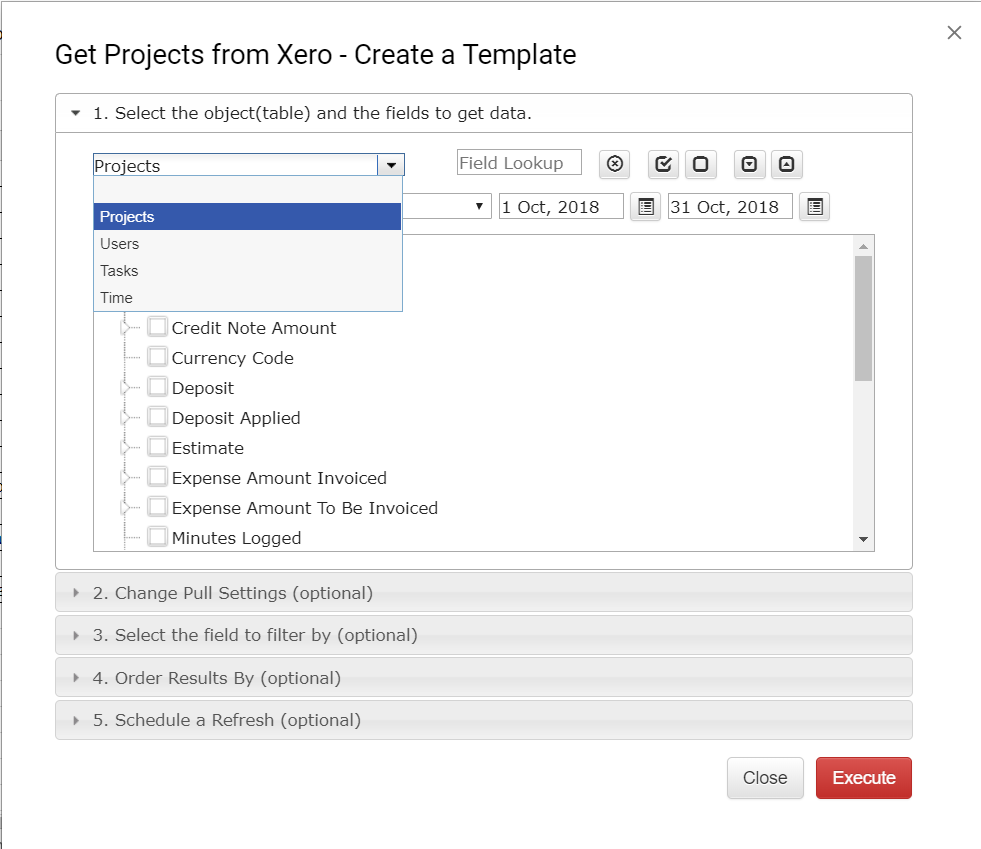
Download Projects, Tasks, Users, and Time into Google Spreadsheet. Refresh anytime in one click or schedule auto-refresh.

It can be done in three easy steps:

1.  Login into your Xero organization and open Get Projects Data window

2. Select the data set

3. Check the results, refresh anytime in one click or schedule auto-refresh

More information can be found here

Note:  If your premium subscription expired, you can still try Xero Projects free for 30 days.

Please send your feedback to support@accon.services or leave a comment here.

 

Author

Join the mailing list

Subscribe

Related Blogs

Explore more articles to deepen your understanding and enhance your workflows. From expert tips to success stories, find the insights you need.
G-CashFlow vs. Float
05/22/2026
-
Est. Reading: 5 minutes

G-CashFlow vs. Float: Which Cash Flow Tool Fits How You Work?

By Andrew Robert Shassetz
Read the article
Best Cash Flow Forecasting Software
05/21/2026
-
Est. Reading: 7 minutes

The Best Cash Flow Forecasting Software for Small Businesses in 2026

By Andrew Robert Shassetz
Read the article
How to Manage Multiple QuickBooks Clients
05/12/2026
-
Est. Reading: 5 minutes

How to Manage Multiple QuickBooks Clients From a Single Google Sheet

By Andrew Robert Shassetz
Read the article
© Copyright 2026 G-Accon
crossmenu